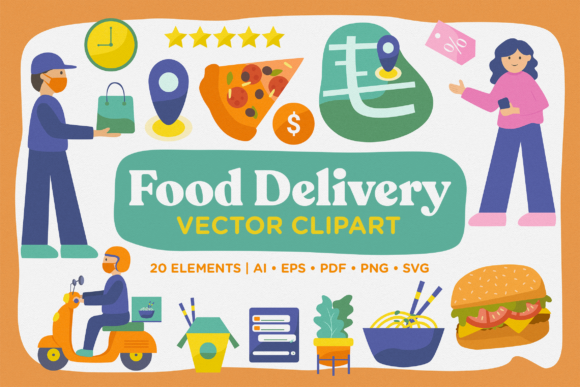
Food Delivery Vector Clipart Pack for Real‑World Projects
Whether you’re sketching out a new food delivery app, building a landing page for a local restaurant, or creating social media content for a meal‑kit service, the right visuals can make or break your message. Stock photos often feel stiff, and generic icons rarely capture the energy of a busy kitchen or the speed of a courier. That’s where the Food Delivery Vector Clipart Pack comes in — a set of 21 AI, 21 EPS, 21 PDF, 20 PNG, and 20 SVG files filled with modular, ready‑to‑use illustrations. No complicated licensing, no hours of editing. Just drag, drop, and adapt.
What’s Inside the Pack
The pack contains 20 distinct modular clipart elements — think delivery bags, scooters, hot meals, drinks, tracking apps, and happy customers — plus a few bonus files. Each asset comes in five formats: AI, EPS, PDF, PNG, and SVG. That means you can open the vector files in professional design software (Adobe Illustrator, Affinity Designer, Sketch) or drop the PNGs and SVGs straight into Canva, Figma, Photoshop, or even a presentation tool like Keynote or PowerPoint. The modular design lets you resize, recolor, and remix every element without losing quality. Need a delivery scooter in your brand color? Done. Want to combine a takeout box with a speech bubble for a blog graphic? Two clicks.
Landing Pages and App Onboarding
When you’re designing a landing page for a food delivery startup, the first few seconds matter. Visitors need to see what your service looks like — not read five paragraphs. A hero image of a delivery bike with a steaming meal, created from the modular clipart, immediately communicates speed and warmth. The SVG format is especially handy here because it stays crisp on retina screens and loads fast. For an app onboarding screen, you can use the same illustration to show step‑by‑step how ordering works: select food, pay, track delivery. The consistent style across all assets keeps the flow smooth.
Social Media and Advertising
Running a quick promotion for a lunch special? Pull a PNG of a bento box with a scooter, overlay your discount text, and post it to Instagram Stories. Because the clipart is vector‑based, you can scale it down for a thumbnail ad or blow it up for a Facebook cover photo without pixelation. Marketers I know have used these assets to create a series of posts showing “order in 3 taps” — each step illustrated with a different modular element. The result? Ad engagement jumped because the visuals looked clean and intentional, not thrown together from random stock.
Email Newsletters and E‑books
Email design often suffers from bloated images that slow load times. The PNG and SVG files in this pack are lightweight enough to embed directly into Mailchimp or constant Contact newsletters. A local meal‑kit company used the pizza box illustration as a header image for their weekly recipe email. Subscribers reported that the illustration “felt friendly” and matched the brand’s casual tone. For e‑books or guides — say, “How to Start a Meal Prep Business” — these clipart pieces become chapter dividers, page accents, or cover elements. The PDF format is especially useful for print‑ready layouts or sharing with clients who don’t have design software.
Presentations and Pitch Decks
Entrepreneurs pitching to investors or partners often need to visualize their logistics. Instead of a boring slide with bullet points, you can drop a modular illustration of a delivery route (scooter + map pin + clock) to show how your service covers a city. The EPS files are ideal here because they can be edited in vector applications while keeping layers separate. One founder I spoke to took the scooter clipart, changed its color to match his brand, and added a small text label below it. The slide became the most memorable part of his deck, he said, because the audience instantly grasped the concept.
Freelance Designers and Creative Entrepreneurs
If you’re a freelancer juggling multiple projects, time is your scarcest resource. Having a ready‑made set of food delivery illustrations means you don’t have to draw a delivery bag from scratch every time you get a food‑themed client. You can adapt the clipart to different brand styles — change colors, add patterns, combine elements with your own typography. The AI and EPS files give you full control over every anchor point. And if a client needs a quick mock‑up, you can send them a transparent PNG that works instantly in their own Canva or Figma account.
Small Business Owners (Restaurants, Caterers, Meal Prep Services)
You don’t need to be a designer to use these assets. A small bakery that just started offering delivery can take a PNG of a takeout box, add a simple text overlay, and post it on Instagram. A meal prep service can use the scooter graphic on their website’s checkout page to reassure customers about delivery speed. Because the files come in multiple formats, you’re not locked into any one software. A restaurant owner told me he uploaded a few SVGs to his Wix site and they displayed perfectly without any coding.
Bloggers and Content Creators
Food blogs often struggle with visual consistency when they talk about ordering in or reviewing delivery services. With the modular clipart, you can create a branded “delivery week” series: use the same scooter illustration in different colors to mark each post. The PDF files can be printed for physical content — like recipe cards or stickers to include in customer orders. A lifestyle blogger I know used the delivery bag graphic as a recurring icon in her newsletter, making it instantly recognizable.
Educators and Online Course Creators
If you teach business, marketing, or entrepreneurship, visual aids help students understand abstract concepts. A slide showing “customer journey in food delivery” becomes clearer when you use the sequence of modular images: phone → food → scooter → doorstep. The vector format means you can enlarge any part of the illustration for a detailed close‑up during a webinar. One instructor used the pack to create a mock-up of a food app for her UX design course; students could study the visual hierarchy without being distracted by pixelated graphics.
What to Consider Before Using the Pack
While the pack is versatile, a few practical details will help you get the most out of it. First, check the file resolution of the PNGs — they are likely 300 dpi or higher, but always confirm before printing large banners. The SVG files are excellent for web and apps, but some older email clients may not render them correctly; in those cases, use the PNG fallback. The AI and EPS files require vector editing software, so if you only use Canva or Figma, stick with the PNG and SVG versions. Also, because the clipart is modular, you can mix elements from different files — but keep an eye on style consistency across colors and scales. The pack includes a range of styles, so decide early whether you want a flat, modern look or a more detailed, illustrated feel.
Another consideration: attribution. Most vector packs like this come under a commercial license without attribution required, but always read the license terms bundled with the download. If you plan to use the clipart in a product you sell (like a template or an app), confirm that the license covers redistribution. For typical website, social media, and presentation use, you’re almost certainly fine.
Real‑World Scenario: Launching a Local Grocery Delivery Service
Let’s say you’re helping a friend launch a small grocery delivery service in a town. They have no brand guidelines yet, just a logo. You grab the scooter and grocery bag clipart from the pack, customize the colors to match the logo, and create a single landing page hero image. For the Facebook ad, you overlay a short discount code on the PNG version. For the onboarding email series, you use the same grocery bag icon in different sizes as dividers. The service goes live, and within a week, the friend reports that several customers said the website “looks professional” — even though you spent less than two hours on visuals. That’s the real value of a well‑made clipart pack: it lets you focus on message and speed, not illustration from scratch.
Why Modular Clipart Fits Modern Workflows
Many design teams now work in Figma or Canva because collaboration is faster. The clippable, resizable nature of vectors means everyone on the team — from the copywriter to the developer — can pick and place assets without waiting for a designer. The 20 SVG files in the pack are particularly useful for design systems: you can import them into Figma components, adjust colors with global styles, and reuse them across multiple screens. Modular clipart also makes A/B testing easier. Swap a delivery scooter for a bicycle illustration in a banner and see which drives more clicks. Because the assets are consistent, the test compares the element, not the style.
Final Practical Notes
If you’re buying or downloading the Food Delivery Vector Clipart Pack, take a minute to browse through all files before starting a project. You might spot a combination you hadn’t considered — like using the phone illustration as a background pattern in your newsletter. Keep the SVG files organized in a folder because they compress well and work everywhere. For print materials, use the PDF or AI files so you can set CMYK colors if needed. And if you ever need to scale a clipart element to banner‑size (say, 3 feet wide), the vector formats will hold up. Just remember to simplify overlapping elements to keep the file size reasonable.
Whether you’re a freelancer chasing a tight deadline, a marketer building a campaign in Canva, or a small business owner trying to make your delivery service look established, this pack gives you a library of food‑themed visuals that work out of the box — no extra design degree required.