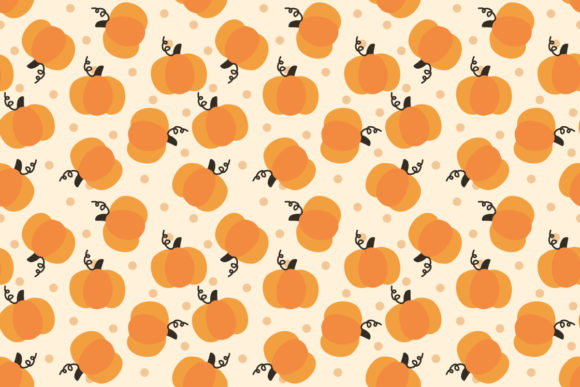
Cute Pumpkin Seamless Pattern
A well-designed seamless pattern can transform an ordinary project into something memorable, and the Cute Pumpkin Seamless Pattern does exactly that for autumn-themed work. Whether you are designing fabric for a seasonal collection, creating digital scrapbook paper, or building a warm background for a holiday website, this pattern offers a repeatable motif that feels both playful and professional. The pattern comes as a zip file containing both EPS 8 and JPG formats, making it accessible across design tools such as Affinity Designer, Inkscape, and Adobe Illustrator. But before you download and start applying it to every surface in sight, there are several practical details worth understanding first. Many users assume that any seamless pattern will work perfectly in any context, and that assumption often leads to frustration, wasted materials, or underwhelming results.
The appeal of a cute pumpkin seamless pattern lies in its versatility. It can function as a textile print for tote bags or aprons, a wrapping paper motif for fall gifts, a wallpaper accent for a seasonal room refresh, or a digital background for social media posts. However, the same pattern can look charming on a phone case but muddy on a large-format backdrop if you have not checked resolution, scaling, or color mode ahead of time. The difference between a pattern that delights and one that disappoints often comes down to how carefully you evaluate the file before putting it to use.
Overlooking the difference between vector and raster formats
A common misunderstanding among beginners and even some experienced creators is assuming that the JPG version of the pattern is all they need. While the JPG included in the zip file is convenient for quick previews or low-resolution digital use, it is a raster image. That means it has a fixed pixel dimension. If you stretch it beyond its native size, you will see pixelation. The EPS 8 format, on the other hand, is a vector file. It can be scaled infinitely without losing sharpness, making it the correct choice for large prints, high-resolution wallpapers, or fabric rolls. Using only the JPG for a project that requires scaling is a mistake that directly affects quality. Instead, open the EPS 8 file in a vector-compatible program such as Adobe Illustrator or Affinity Designer. From there, you can export the pattern at the exact resolution and dimensions your project demands. The EPS 8 format also preserves clean edges and consistent color, which is especially important when the pattern includes cute, detailed pumpkin shapes.
Ignoring the color profile before printing or exporting
Another overlooked detail is color management. The Cute Pumpkin Seamless Pattern was likely designed in a specific color space, and if you open it in software that defaults to a different profile, the warm oranges and soft greens can shift dramatically. This is especially problematic if you plan to print the pattern on fabric or paper. Many creators skip the step of checking whether the file uses CMYK for print or RGB for screen, and the result is a print that looks dull, overly bright, or completely off-tone. Before you send anything to production, open the EPS file, verify the color mode under your document settings, and convert it if necessary. If you are printing at home, also check that your printer driver is not applying automatic color correction that overrides the file data. Taking two minutes to confirm the color profile saves you from wasting material and losing the cute, inviting look that made you choose the pattern in the first place.
Misjudging scale and repeat size for the intended application
A mistake that even seasoned designers sometimes make is failing to consider how the pattern will look at different scales. A seamless pattern that appears perfectly balanced on a computer screen can look too busy on a large backdrop or too sparse on a small piece of fabric. The Cute Pumpkin Seamless Pattern has a specific repeat size built into the file. If you apply it without adjusting the scale to match your surface area, the pumpkins may repeat too frequently or not frequently enough. For example, using the pattern at full scale on a gift box could make each pumpkin tiny and hard to recognize, while using the same pattern at 10 percent scale on a wallpaper could make the pumpkins look comically oversized. The better approach is to test the pattern at multiple scales directly within your design software. Create a mockup of your actual surface, tile the pattern, and zoom out to see the overall effect. Adjust the scale until the repeat feels intentional and pleasing to the eye. This step takes very little time and prevents the disappointment of finishing a project only to realize the pattern overwhelms or underwhelms the design.
Assuming the pattern works for every substrate without testing
Not all materials handle patterns the same way. A cute pumpkin seamless pattern that looks crisp on a computer monitor may bleed, warp, or lose detail when printed on dark fabric, textured paper, or stretchy material. Many users make the mistake of ordering a large quantity of printed fabric or custom wallpaper without first creating a small sample. The result can be costly and frustrating. If you are a small business owner selling autumn-themed merchandise, the last thing you want is a batch of tote bags with pumpkins that look smeared or faded. The practical solution is to request a physical swatch from your printer or print a small test piece at home. Pay attention to how the orange tones behave on the substrate, whether the fine lines stay sharp, and whether the pattern aligns properly at the seams. For digital use, test the pattern on actual device screens at different brightness levels. This extra verification ensures that the end product matches the quality you envisioned and that your customers or audience receive the same cute, polished look you saw on your screen.
Neglecting the terms of use for commercial projects
If you are a freelancer, entrepreneur, or small business owner, you likely plan to use the Cute Pumpkin Seamless Pattern in products you sell. This is where many creators run into trouble. They assume that buying a digital pattern grants unlimited commercial rights, but that is not always the case. Some patterns are sold with restrictions on the number of products you can make, the type of products, or whether you can include the pattern in a larger design for resale. Before you open the zip file, read the product description or license agreement carefully. If the terms are unclear, contact the seller for clarification. Using a pattern without understanding the license can lead to legal issues or having your products removed from marketplaces like Etsy or Amazon. The responsible move is to keep a copy of the license with your project files so you can refer back to it if questions arise later. This way, you can sell your handmade goods, digital templates, or physical items with confidence, knowing that you are respecting the creator's rights and protecting your own business.
Choosing the wrong software for editing and exporting
The Cute Pumpkin Seamless Pattern is delivered in EPS 8 format, which is a widely compatible vector format. However, not every program handles EPS files well. Some free or basic image viewers may not render the file correctly, causing you to think the pattern is broken or low quality. The mistake here is trying to edit or export the pattern using software that does not fully support vector graphics. The pattern is specifically noted as suitable for Affinity Designer, Inkscape, and Adobe Illustrator. If you try to open it in a program like Microsoft Paint or a basic photo editor, you will likely lose the vector properties and end up with a flattened, blurry version. The better practice is to use a vector-based application where you can manipulate the pattern, change colors if needed, and export at any resolution. Even if you are a beginner, these programs offer free trials or free versions like Inkscape that give you full control over the file. Investing a little time in learning the basics of your chosen software pays off by letting you get the most out of the pattern for years to come.
Overcomplicating the pattern when simplicity works best
Sometimes the mistake is not technical but creative. Designers and hobbyists alike can fall into the trap of overworking a pattern. The Cute Pumpkin Seamless Pattern already has a cohesive, charming design. Adding too many extra elements, heavy filters, or competing motifs can clutter the result and dilute the cute factor. A better approach is to let the pattern shine as a standalone backdrop or accent. Use it as a repeat background on a website without overwhelming it with text boxes or graphics. Pair it with solid colors from the palette to give the eye a place to rest. If you are making a textile, consider using the pattern on one panel and a complementary solid on the adjacent panel. Allowing the pattern to breathe makes it more effective and more appealing to your audience. Sometimes the most professional decision you can make is to trust the design you chose and keep the rest of your composition simple.
What to check before you buy or download
Before you add the Cute Pumpkin Seamless Pattern to your cart or start the download, take a moment to verify a few key details. Confirm the file format list includes EPS 8 and JPG, and that you have software capable of opening both. Check the resolution of the JPG if you plan to use it directly, and ensure it meets the requirements of your project. Review the commercial license if you intend to sell products featuring the pattern. Look at the color palette shown in the preview and consider whether it matches your existing brand or project colors. Some patterns offer multiple color variants, while others are fixed. If the preview shows warm oranges, creams, and soft greens, make sure those tones align with your vision. Finally, read reviews or ratings from other buyers, especially those who used the pattern for a similar purpose. Their experience can alert you to any quirks or confirm that the pattern delivers on its promise. Taking these steps before you buy turns a hopeful purchase into a confident investment.
The Cute Pumpkin Seamless Pattern is a versatile, charming resource when used with the right preparation. By understanding the difference between vector and raster, managing color profiles, testing scale and substrate, respecting licensing, and using proper software, you avoid the common pitfalls that lead to disappointing results. Whether you are a small business owner preparing a product line, a blogger designing seasonal graphics, or a hobbyist creating a themed gift, the pattern can serve you well. The key is to approach it with the same care you would apply to any other design asset. Check the details, test your outputs, and let the pattern do what it does best: bring a warm, playful touch to your work without any of the frustration that comes from overlooked fundamentals.