Earrings Template Cut File: DIY Crafting Made Simple
If you have ever wanted to design your own earrings but felt limited by time, tools, or drawing skills, an earrings template cut file offers a practical shortcut. These digital patterns are ready-to-use designs that you can load into a cutting machine, select your material, and let the device do the precise cutting for you. Whether you are making a single pair for yourself or producing small batches for a shop, these templates remove the guesswork and deliver consistent, professional results.
What Exactly Is an Earrings Template Cut File?
An earrings template cut file is a digital pattern created specifically for electronic cutting machines such as Cricut and Silhouette. Instead of manually tracing or cutting shapes by hand, you load the file into your machine’s software, adjust the size if needed, and send it to cut. The file itself contains vector paths that tell the blade exactly where to go, so every earring comes out identical to the original design.
These templates support a wide range of materials. You can cut earrings from leather, felt, faux leather, craft foam, thin wood veneer, and even cardstock. Because the files are digital, you can reuse them as many times as you like, scaling them up or down to create different sizes or matching sets. This flexibility makes them especially valuable for anyone who wants to experiment with new materials without redrawing the design each time.
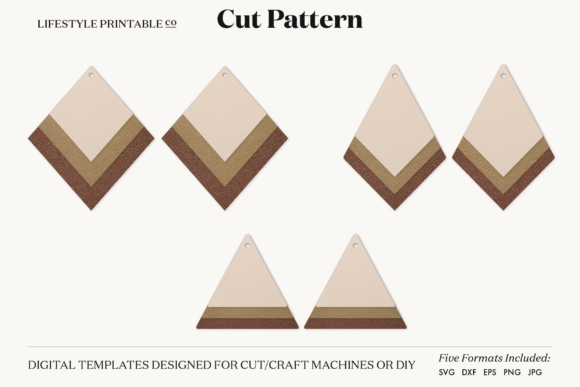
A good template set arrives in multiple formats so it works across different software and devices. Most collections include SVG files for programs like Silhouette Designer Edition, Cricut Design Space, Adobe Suite, Inkscape, and Corel Draw. They also include DXF for Silhouette Studio Basic Edition, EPS for vector editors, PDF for printing or hand tracing, plus high-resolution PNG and JPG files at 300 dpi for reference or printing on transfer materials. Having all these formats in one download means you never have to worry about compatibility.
Why These Digital Patterns Appeal to Modern Makers
The appeal of an earrings template cut file goes beyond convenience. For beginners, the biggest hurdle is often getting a design that looks polished and symmetrical. Earrings require balanced shapes, matching left and right pieces, and clean edges. A professionally drafted template handles all of that before you even load your material. You can start with a well-proportioned design and focus on choosing colors, textures, and finishes.
For experienced crafters and small business owners, the value lies in speed and repeatability. When you need to produce multiple pairs for a craft fair or an online order, cutting each piece by hand becomes impractical. A digital template lets you cut several pairs in minutes, with every piece identical. This consistency builds trust with customers who expect a uniform product.
Entrepreneurs and makers who sell at markets or on platforms like Etsy also appreciate the low startup cost. A single template set can be used to create dozens of variations simply by changing materials or adding paint, glitter, or hardware. You are not locked into one look. The same basic shape cut from metallic faux leather feels completely different from one cut in matte suede or natural wood veneer.
Materials That Work Best with Your Cut Files
One of the strengths of these templates is their material versatility. Leather and faux leather are popular choices because they are durable, flexible, and come in countless colors and textures. Felt works well for lightweight, bohemian-style earrings, and it cuts cleanly without fraying if you use a sharp blade and appropriate settings. Craft foam is inexpensive and great for practice or for making playful, colorful designs that children can wear.
Thin wood veneer or basswood sheets produce earrings with a natural, earthy aesthetic. These require a slightly stronger cutting machine and a deep-cut blade, but the result is sturdy and lightweight. You can leave the wood unfinished, stain it, or paint it to match an outfit. Each material brings a different feel, so you can match the template to the occasion or season without buying a new pattern each time.
Some makers also use acrylic sheets or chipboard for more structured designs. The key is to check your machine’s specifications for thickness and cutting speed. A high-quality template file that includes a test cut suggestion or material guide can save you from wasting material on trial and error.
Personal Gifts and Matching Sets
Handmade earrings make thoughtful gifts for birthdays, holidays, or bridal parties. With a digital template, you can cut multiple pairs quickly and customize each pair for the recipient. Choose their favorite color leather, add a monogram, or pair the earrings with a matching keychain or bookmark from the same file. Because the template is digital, you can resize it to create a set of studs, drops, and dangles that coordinate without being identical.
Small Business Production
Sellers often need to maintain stock across different styles. Using an earrings template cut file, you can batch-produce core designs and then experiment with limited-run colors. For example, cut fifty pairs of a bestselling shape in black faux leather, then switch to metallics for the holiday season. The file remains the same, but the product line evolves. Many sellers also appreciate that the template includes versions with and without pre-punched holes, so they can add jump rings and ear wires exactly where needed.
Workshops and Classroom Projects
Educators and workshop leaders can use these templates to teach design basics, material properties, or machine operation. Students can each choose a material, cut the same template, and then compare how leather behaves versus felt versus foam. This hands-on approach builds confidence with cutting machines and gives everyone a finished product they can take home. The PDF version works well for hand-cutting practice if machines are not available.
Content Creation and Marketing
Bloggers and social media creators can use template earrings to produce visual content around the making process, material comparisons, or styling tips. A time-lapse video of a Cricut cutting felt earrings is both satisfying and informative. A blog post comparing five different materials cut from the same SVG file gives readers a practical resource while showcasing the versatility of the template. These files also work for affiliate marketing or sponsored posts where you demonstrate a specific brand of machine or material.
What to Look for When Choosing a Template Set
Not all earrings template cut files are created equal. Before you download a set, consider the following points so you get a file that performs well and fits your workflow.
- Format variety: A reliable set includes SVG, DXF, EPS, PDF, PNG, and JPG files. This ensures you can use the design whether you run a Windows, Mac, or tablet-based setup.
- Hole options: Having both versions with and without holes saves time. You can cut with holes for immediate assembly or without holes if you plan to drill or punch your own placement later.
- Zip organization: Well-organized zip files separate the formats clearly and label each file intuitively. Avoid sets that dump all files into one unlabeled folder.
- Machine compatibility: The description should confirm that the SVG works with Cricut Explore, Cricut Maker, Silhouette Cameo, Silhouette Portrait, and other machines that accept SVG. DXF support is essential for Silhouette Studio Basic Edition users.
- Resolution for raster files: PNG and JPG should be at least 300 dpi. This matters if you want to print the design on transfer paper, sticker paper, or fabric for mixed-media projects.
Getting Started with Your First Project
If you are new to digital cutting, start with a material you feel comfortable handling. Felt or faux leather are forgiving for first-time cuts because they are soft and easy to weed. Load the SVG file into your machine’s software, check the size against your desired earring length, and run a quick test cut on a scrap piece. Adjust the blade depth and pressure if the material does not cut through cleanly on the first pass.
Once the pieces are cut, remove any excess material with a weeding tool. At this stage, you have the basic earring shapes ready. Add ear wires or stud posts using jump rings or adhesive, depending on the design. If you purchased a template that includes hole placements, the assembly is straightforward because the holes are already cut to the correct size.
Many makers keep a small notebook where they log the machine settings that worked for each material. Next time you cut leather from a different supplier, you can refer back to those notes instead of guessing. This habit saves material and frustration, especially when you are working with expensive supplies like genuine leather or specialty wood.
As you become more familiar with the process, you can start layering materials. Cut the same earrings template from two different colors of felt, glue them together, and add a decorative stitch hole effect with a marker. Or cut the base from wood and the overlay from faux leather for a mixed-material look. The template is just the starting point—your creativity determines the final style.
An earrings template cut file is more than a digital download. It is a reusable tool that turns an idea into a finished product with minimal waste and maximum consistency. Whether you are crafting for yourself, starting a side business, teaching a class, or creating content, these patterns give you a reliable foundation. Choose a set that includes all the formats you need, experiment with different materials, and enjoy the fact that each pair you make is an original made possible by a well-designed digital file.